 Plainsight
Private budgeting for iPhone · Made in Canada
Your spending, in plain sight
Every credit card on one calm page, built from the statements you already download. No sign-up, no login, no bank password. Your financial data never leaves your phone.
What it does
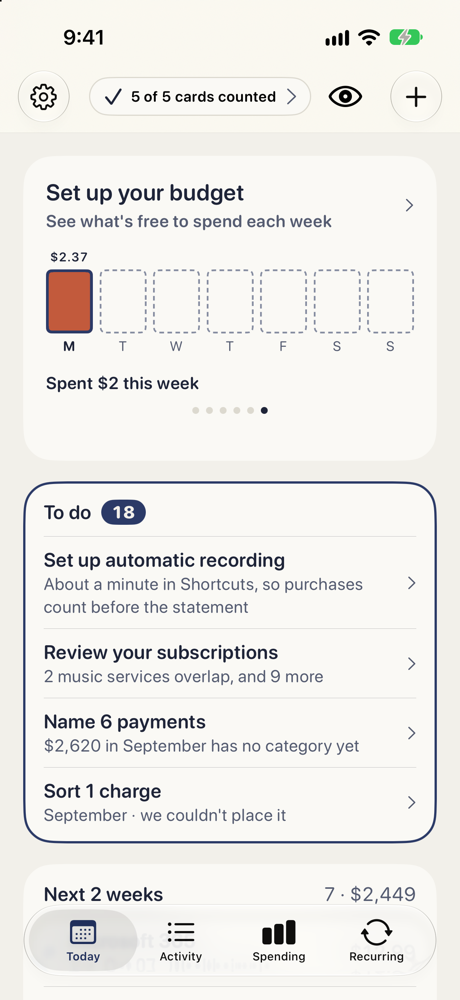
Every card, one page
Share a statement from your bank's app or website. Plainsight reads it and shows all your cards together, with duplicates matched.
Subscriptions and bills, found
See every renewal coming up, what changed in price, and what you stopped paying for.
Private by design
No account and no login. Open the app and start. No bank password, and no servers holding your money data. Everything is worked out on your iPhone.
Help shape Plainsight
Plainsight is in beta. If a friend sent you an invite link, tap it on your iPhone. You'll get the app through TestFlight and a button for sending ideas and bug reports.
Support
Questions, a bank whose statements don't import, or a bug? Email [email protected]. A real person reads every message.
Please don't attach your statements. If an import fails, tell us the bank, the card and the file type (CSV or other), and we'll take it from there.
Does Plainsight connect to my bank?No. You download your statement from your card issuer's website or app and share it to Plainsight. Plainsight never asks for your banking password.
Do I need an account?No. There's no sign-up and no login. Your data is stored only on your iPhone, and if you delete the app, its data is deleted too.
Which banks and cards work?Any bank or card. Download a statement from your bank's website or app and share it to Plainsight.
What if I import the same month twice?Overlapping statements are matched, so transactions are not counted twice.
How do I cancel a subscription Plainsight found?Open the subscription and tap the cancel link. It takes you to that service's own cancellation page. Plainsight can't cancel anything for you, because it never has your logins.